The short answer
If the project uses git, run git status and git diff to see what the agent changed, then git restore <file> to put a file back. Inside the tools, Claude Code has /rewind and Cursor has Restore Checkpoint; Codex CLI has no command that restores files. Files never committed to git need Time Machine or Agent Undo.
On this page
First: stop the agent and look before you fix
Stop the session (Esc in Claude Code and Codex, the stop button in Cursor) so it doesn't keep editing while you work out what happened. Don't ask it to fix its own change yet: each new edit makes the original harder to get back. Then find out what changed.
See and undo the changes with git
If the folder is a git repository, git already knows every difference from your last commit. Run these in Terminal from the project folder:
git status          # files changed, deleted and added
git diff            # the exact lines changed in tracked files
git clean -n # new untracked files (only lists, deletes nothing)| What happened | Command |
|---|---|
| The agent edited a file | git restore path/to/file |
| The agent deleted a tracked file | git restore path/to/file |
| Undo every change to tracked files | git restore . |
| Keep the changes aside instead of losing them | git stash push --include-untracked |
| The agent made a commit | git log, then git revert <commit> |
| You undid too much | git reflog lists where the branch has been, so you can go back to it |
The agent edited a file
- Command
git restore path/to/file
The agent deleted a tracked file
- Command
git restore path/to/file
Undo every change to tracked files
- Command
git restore .
Keep the changes aside instead of losing them
- Command
git stash push --include-untracked
The agent made a commit
- Command
git log, thengit revert <commit>
You undid too much
- Command
git refloglists where the branch has been, so you can go back to it
Git can only restore what it has seen. A file that was never committed and that the agent changed or deleted isn't in git's history, so git restore can't bring it back. Files deleted with rm don't go to the Trash either. For those, see files that were never in git.
Claude Code: /rewind
Claude Code takes a checkpoint before each prompt you send. Run /rewind (or its alias /undo), or press Esc twice with an empty prompt, pick the prompt to go back to, and choose Restore code to put the files back while keeping the conversation, or Restore code and conversation to rewind both. Checkpoints are saved with the session, so you can resume a session and still rewind it.
- Shell commands aren't covered. A file changed only by a Bash command, such as
rm,mvor a script, isn't tracked and stays as it is. - Most subagent edits aren't restored, except to files Claude had already edited in your conversation.
- Symlinked and hard-linked files are skipped, which includes files pnpm hard-links into place.
- Snapshots expire: by default they are deleted about 30 days after the session last saved one.
Cursor: Restore Checkpoint
Cursor's Agent saves a checkpoint before significant changes. Click Restore Checkpoint on an earlier request, or hover over a message and click +, to put every modified file back as it was at that point. Restoring changes files only: the messages stay in the chat. Cursor keeps checkpoints on your Mac, separate from git, and its documentation says to use them only for undoing Agent changes.
Codex CLI: use /diff, then git
Codex CLI's slash commands include no command that restores files (checked 22 November 2026). Run /diff to see what Codex changed, staged, unstaged and untracked, then undo it with git as above. Esc twice with an empty composer edits your previous message and forks the chat; it doesn't put files back.
For a big task, /worktree runs Codex in a separate git worktree, so its changes stay out of your working copy until you merge them.
Files that were never in git
New files, .env files, local databases and anything in .gitignore aren't in git's history. If an agent overwrote or deleted one, try these in order:
- The agent's own undo, if the agent edited the file with its editing tools (Claude Code's
/rewind, Cursor's Restore Checkpoint). - The Trash, if the file was moved there rather than deleted with
rm. - Time Machine. Open the project folder in Finder, then open Time Machine with Spotlight. Use the arrows to go back to a backup from before the session, select the file and click Restore. Time Machine also keeps local snapshots on the Mac's own disk; how to check when Time Machine last backed up shows how to list them.
- Your editor's local history. In VS Code and Cursor, the Timeline view and the Local History: Find Entry to Restore command (press Command-Shift-P to find it) keep earlier versions of files you edited in the editor.
Agent Undo in iKnowMyMac
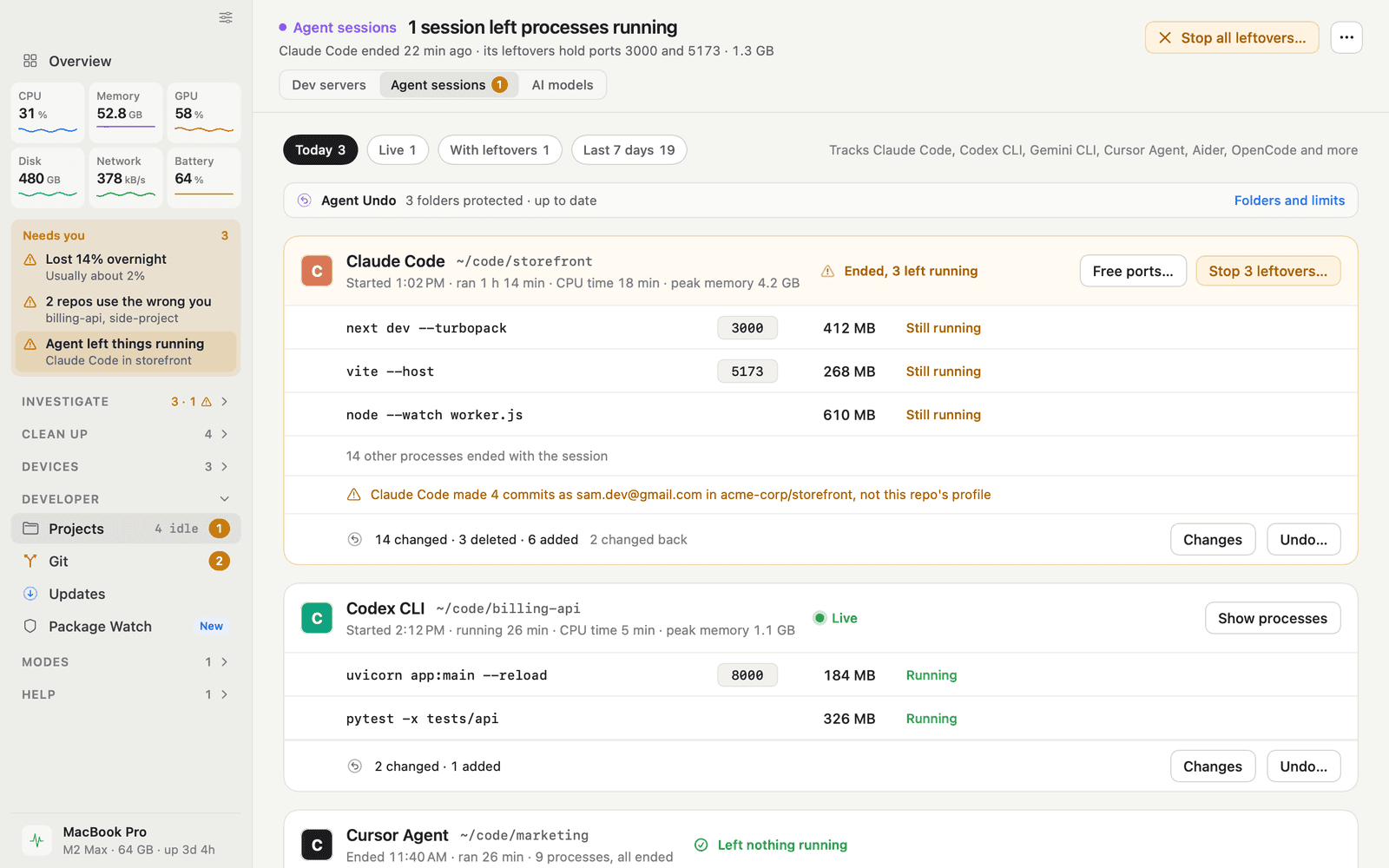
iKnowMyMac's Agent sessions, under Projects, follows each coding agent session from the moment the agent starts, such as Claude Code, Codex CLI, Gemini CLI or Cursor's agent. Agent Undo keeps copies of the files in folders where agents work, so each session's card lists what it deleted, changed and added in the project folder, with Changes and Undo… buttons.
- Put back one file, a few, or the folder as it was when the session started, including files that were never in git.
- A confirmation first lists what will be restored, replaced, removed and left alone.
- Undo the undo: whatever a restore replaces is kept first, so the restore can be taken back too.
Limits: the copies stay on your Mac, on the same disk as the originals, so this is not a backup; keep Time Machine on. The newest change can be missed, and git history isn't covered: it puts files back, not commits.
Before the next session
- Commit or stash first. A clean
git statusbefore you start meansgit diffshows only the agent's work. - Give big tasks their own branch or worktree (
git worktree add ../task-branch -b task-branch, or Codex's/worktree). - Keep secrets and data out of the agent's folder, or at least out of the files it is asked to touch.
- Keep Time Machine on. It's the one option here that keeps copies on another disk.